Audio Streaming
The system has built-in one- and two-way audio streaming support available in the Streamer Output and in the Remote Streamer entity.
-
In Streamer it is accessible under
-
In Remote Streamer it is accessible under
|
Linux specifics
See Linux audio setup for instructions. |
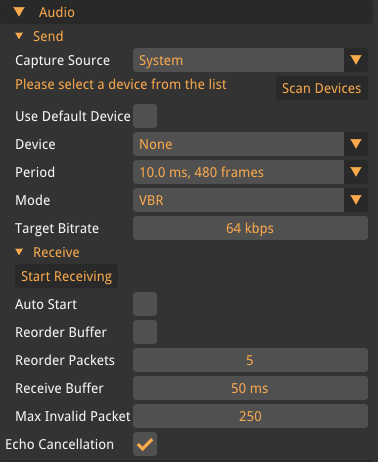
- Audio Processing
-
- Enable
-
Enables the audio processing module
- Echo Cancellation
-
Sets the echo cancellation level
- Noise Suppression
-
Sets the noise suppression level
- Compression Gain
-
Sets the compression gain in decibel (dB).
- Send
-
- Capture Source
-
Which capture source to use. Use the System capture source.
- Use Default Audio
-
Use the default audio recording device.
- Device
-
The device to use for streaming audio.
- Period
-
The amount of audio samples to capture before sending.
- Mode
-
VBR (variable bitrate) or CBR (constant bitrate)
- Target Bitrate
-
The desired bitrate. The default 64 kbps is enough for most applications.
- Receive
-
The receiver always uses the default audio playback device.
- Auto Start
-
Enable to automatically receive audio on project startup.
- Reorder Buffer
-
Enable to use a buffer for incoming packets. Useful in situations where the network has packet reordering.
- Reorder Packets
-
The maximum amount of packets to keep in the reorder buffer
- Receive Buffer
-
The amount of time that the audio playback system is allowed to buffer.
- Max Invalid Packets
-
The amount of invalid packets to receive before accepting them as valid. Internally, a packet is invalid if it has an older timestamp than the previous packet. That can happen if the network has a lot of packet reordering. The reorder buffer can help to mitigate this. It can also happen if the Streamer restarts. In that case, this setting determines how quickly new audio packets are accepted as valid.
If you experience choppy playback due to a jittery network, please try to first increase the receive buffer. Around 80 ms usually works fine on 4G networks. If that does not help, try activating the reorder buffer and experiment with the amount of reorder packets.